Hallo Zusammen,
ich hab folgendes Problem.
Ich hab auf einer Seite mehrere Container. Diese sind wiederum in 2 unterschiedlichen Containern enthalten. jetzt nimmt jedoch Container 1 sehr viel unnötigen platz ein und somit ist Container 2 sehr klein bzw. nur so groß wie nötig. Es sollte jedoch umgekehrt sein. Container 1 soll so groß wie nötig sein und den rest soll Container 2 einnehmen. Ich benutze bootstrap.
Mein Code:
Aktuell sieht es bei mir dadurch so aus:
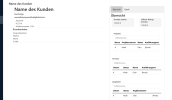
wie Ihr seht, der Container 1 (links) nimmt übertrieben viel platz ein. Auch wenn ich den Inhalt aus dem Container entferne. Dadurch ist der Container 2 (rechts) richtig klein. Aber egal was ich mache, es ändert sich nichts.
Das einzige was bisher funktioniert hat, ist die Weite der Container direkt zu setzen (z.B. 500px;) da ich dies jedoch vermeiden will, suche ich noch eine andere lösung.
ich hab folgendes Problem.
Ich hab auf einer Seite mehrere Container. Diese sind wiederum in 2 unterschiedlichen Containern enthalten. jetzt nimmt jedoch Container 1 sehr viel unnötigen platz ein und somit ist Container 2 sehr klein bzw. nur so groß wie nötig. Es sollte jedoch umgekehrt sein. Container 1 soll so groß wie nötig sein und den rest soll Container 2 einnehmen. Ich benutze bootstrap.
Mein Code:
HTML:
    <div class="ms-5 mt-5">


        <h4>Name des Kunden</h4>


        <div class="container d-flex">

        <div class="container flex-shrink-1 object-fit-scal">

        <div class="container">


            <div class="container colum row mt5 border-bottom">

               <img src="" alt="">

                <h1>Name des Kunden</h1>

                <div class="kundentyp"><h6>Kundentyp</h6></div>

                <div class="rechnungsstellung"><h6>montaliche/quartal/halbjährlich/etc.</h6></div>

                <div class="container d-flex">

                    <div class="container row">

                        <span>Anschrift</span>

                        <span>PLZ Ort</span>

                        <span>Kundennummer: 1125</span>


                    </div>


                </div>


            </div>

        </div>

        <div class="container row border-bottom">

            <h5>Kundendaten</h5>

            <span>Ansprechpartner</span>

            <span>Telefon</span>

            <span>Mobil</span>

            <span>E-Mail</span>

        </div>

        </div>


        <div class="conatiner row object-fit-fill">

            <div class="tab">

                <button class="tablinks active"  onclick="choosetable(event, 'Übersicht')">Übersicht</button>

                <button class="tablinks" onclick="choosetable(event, 'Detail')">Detail</button>

            </div>


            <div id="Detail" class="tabcontent">

                <h3>Detail</h3>

                <p>London is the capital city of England.</p>

            </div>


            <div id="Übersicht" class="tabcontent" >

                <h3>Übersicht</h3>

                <div class="container column d-flex">

                    <div class="container border rundung me-5">

                        <h6>Umsatz (netto)</h6>

                        <span>120,00</span> €

                    </div>

                    <div class="container column border rundung">

                        <h6>offener Betrag (brutto)</h6>

                        <span>120,00</span> €

                    </div>

                </div>


                <div class="container mt-5">

                    <div class="container border-bottom">

                        <h6>Projekte</h6>


                        <input class="form-control" type="text" placeholder="Volltextsuche..."

                            aria-label="Volltextsuche">

                        <table class="table" id="projekte">

                            <thead>

                                <tr>

                                    <th scope="Name">Name</th>

                                    <th scope="Projektnummer">Projektnummer</th>

                                    <th scope="Status">Status</th>

                                    <th scope="Ausführungsort">Ausführungsort</th>

                                </tr>

                            </thead>

                            <tbody class="table-group-divider">

                                <tr>

                                    <th scope="row">1</th>

                                    <td>Mark</td>

                                    <td>Otto</td>

                                    <td>@mdo</td>

                                </tr>

                            </tbody>

                        </table>

                    </div>

                </div>


            <div class="container mt-5">

                <h6>Termine</h6>


                <input class="form-control" type="text" placeholder="Volltextsuche..." aria-label="Volltextsuche">

                <table class="table" id="Termine">

                    <thead>

                        <tr>

                            <th scope="Datum">Datum</th>

                            <th scope="Status">Status</th>

                            <th scope="Name">Name</th>

                            <th scope="Ausführungsort">Ausführungsort</th>

                        </tr>

                    </thead>

                    <tbody class="table-group-divider">

                        <tr>

                            <th scope="row">1</th>

                            <td>Mark</td>

                            <td>Otto</td>

                            <td>@mdo</td>

                        </tr>

                    </tbody>

                    </table>

            </div>


            <div class="container mt-5">

                <h6>Angebote</h6>


                <input class="form-control" type="text" placeholder="Volltextsuche..." aria-label="Volltextsuche">

                <table class="table" id="Termine">

                    <thead>

                        <tr>

                            <th scope="Datum">Datum</th>

                            <th scope="Status">Status</th>

                            <th scope="Angebotsname">Angebotsname</th>

                        </tr>

                    </thead>

                    <tbody class="table-group-divider">

                        <tr>

                            <th scope="row">1</th>

                            <td>Mark</td>

                            <td>Otto</td>

                            <td>@mdo</td>

                        </tr>

                    </tbody>

                    </table>

            </div>


            <div class="container mt-5">

                <h6>Rechnungen</h6>


                <input class="form-control" type="text" placeholder="Volltextsuche..." aria-label="Volltextsuche">

                <table class="table" id="Termine">

                    <thead>

                        <tr>

                            <th scope="Datum">Datum</th>

                            <th scope="Rechnungsnummer">Rechnungsnummer</th>

                            <th scope="Status">Status</th>

                        </tr>

                    </thead>

                    <tbody class="table-group-divider">

                        <tr>

                            <th scope="row">1</th>

                            <td>Mark</td>

                            <td>Otto</td>

                            <td>@mdo</td>

                        </tr>

                    </tbody>

                    </table>

            </div>


            <div class="container">

                <h6>Ausgaben</h6>

            </div>


            <div class="container">

                <h6>Dokumente</h6>

            </div>

        </div>

    </div>

    </div>

    </div>


</body>

<script>

    addEventListener("DOMContentLoaded", (event) => {

        document.getElementById("Übersicht").style.display = "block";

        evt.currentTarget.className += " active";

     })

function choosetable(evt, choose) {

  var i, tabcontent, tablinks;

  tabcontent = document.getElementsByClassName("tabcontent");

  for (i = 0; i < tabcontent.length; i++) {

    tabcontent[i].style.display = "none";

  }

  tablinks = document.getElementsByClassName("tablinks");

  for (i = 0; i < tablinks.length; i++) {

    tablinks[i].className = tablinks[i].className.replace(" active", "");

  }

  document.getElementById(choose).style.display = "block";

  evt.currentTarget.className += " active";

}

</script>

</html>
CSS:
#navigation a{


    padding-right: 25px;

    flex-shrink:initial;

    text-decoration-line: none;

    color: whitesmoke;

    font-size: 20px;

    margin: 2vh;

}

body{

    height: 100vh;

    display: flex;

    margin: 0;

}

.rundung{

    background-color: whitesmoke;

    border-radius: 5px;

    box-shadow: inherit;

}

.navbar{

    background-color:#0a1b2f;

}

.active{

    background-color: #39495a;

}

/* Style the tab */

.tab {

  overflow: hidden;

  border: 1px solid #ccc;

  background-color: #f1f1f1;

}


/* Style the buttons that are used to open the tab content */

.tab button {

  background-color: inherit;

  float: left;

  border: none;

  outline: none;

  cursor: pointer;

  padding: 14px 16px;

  transition: 0.3s;

}


/* Change background color of buttons on hover */

.tab button:hover {

  background-color: #ddd;

}


/* Create an active/current tablink class */

.tab button.active {

  background-color: #ccc;

}


/* Style the tab content */

.tabcontent {

  display: none;

  padding: 6px 12px;

  border: 1px solid #ccc;

  border-top: none;

}
Aktuell sieht es bei mir dadurch so aus:
wie Ihr seht, der Container 1 (links) nimmt übertrieben viel platz ein. Auch wenn ich den Inhalt aus dem Container entferne. Dadurch ist der Container 2 (rechts) richtig klein. Aber egal was ich mache, es ändert sich nichts.
Das einzige was bisher funktioniert hat, ist die Weite der Container direkt zu setzen (z.B. 500px;) da ich dies jedoch vermeiden will, suche ich noch eine andere lösung.
 . Ich will es ja direkt richtig machen.